 Sonaudit
Delivering a finished film, commercial, or episodic program to a broadcaster, streaming network, or distributor rarely ends with loudness compliance. Even after dialogue intelligibility is verified and True Peak ceilings (-1.0 or -2.0 dBTP) are met, technical delivery specifications almost universally mandate an itemized Music Cue Sheet (MCS).
A Music Cue Sheet is the legal ledger of every musical work in a production. It logs the in-timecode, out-timecode, duration, track title, composer, artist, publisher, and usage category for every cue. Performance Rights Organizations (PROs) including ASCAP, BMI, SESAC, PRS for Music, SACEM, GEMA, and JASRAC use this ledger to distribute broadcast royalties.
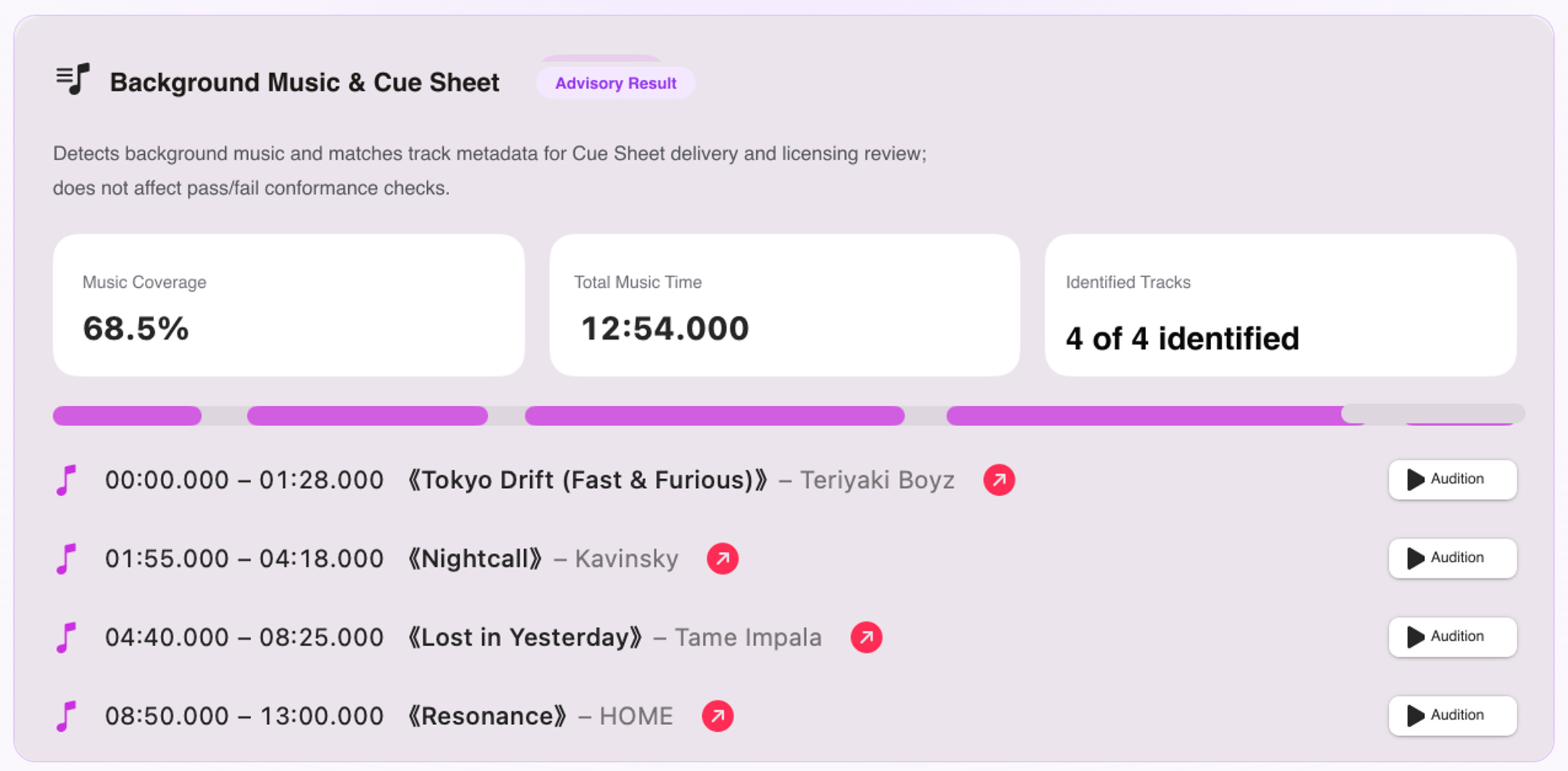
Missing cues, inaccurate durations, or wrong timecodes can cause technical ingest rejections, holding back distribution milestones and escrow payments. Sonaudit provides an automated macOS preflight workflow that reads rendered video and audio containers locally, identifies background music cues via acoustic fingerprinting, and exports compliant cue sheets alongside technical QC reports.
The broadcast delivery mandate and legal royalty compliance
Music rights clearance is as critical as color timing or audio mastering. When networks like HBO, Netflix, BBC, or NHK license content, their legal teams verify that every audible second of music is accounted for. Broadcast licenses do not permit unidentified music; each appearance incurs public performance and mechanical royalty obligations.
PROs operate global reciprocal agreements. When a program airs in the US, ASCAP and BMI collect broadcast fees and distribute royalties based on submitted cue sheets. If broadcast in the UK (PRS), Germany (GEMA), France (SACEM), or Japan (JASRAC), local societies require the same itemized timecodes.
Submitting an inaccurate cue sheet creates serious commercial friction: master delivery packages are placed on hold, completion bonds withhold release funds, and distributors may issue contractual penalties. A compliant cue sheet is a mandatory delivery deliverable.
The anatomy of an industry-standard Music Cue Sheet
Broadcasters enforce strict taxonomies for cue sheets. Understanding these fields ensures your exported documentation passes technical review on the first pass:
- Cue Number (#): Chronological sequence of musical appearances across the program runtime.
- Cue Title: Registered commercial song title, library cue name, or commissioned work title.
- Usage Type Classification: Standardized categories including Theme Music (TM), Background Instrumental (BI), Background Vocal (BV), Visual Instrumental (VI), Visual Vocal (VV), and Stinger/Logo (ST).
- Timecodes (In / Out): Precise start and end offsets formatted as HH:MM:SS or SMPTE timecode (HH:MM:SS:FF).
- Duration: Net audible running time measured in minutes and seconds.
- Performer / Artist: Featured recording artist, band, orchestra, or ensemble on the master recording.
- Composer / Writer: Legal composer names, CAE/IPI numbers, and copyright ownership percentages.
- Publisher: Publishing administrator or production music library collecting performance royalties.
- Record Label / Master Owner: Commercial record label or entity holding phonographic master rights.
Why manual timeline scrubbing and XML/EDL exports fail
Modern sound design timelines routinely span 30 to 80 audio tracks across Final Cut Pro, Premiere Pro, or DaVinci Resolve. By the time a master sequence is locked, manually reconstructing the music log presents major bottlenecks.
Exporting an EDL or XML from an NLE rarely produces a usable cue sheet for three key reasons: First, inactive clips, muted takes, and audition layers on hidden tracks create ghost entries in XML exports. Second, stock library tracks often carry arbitrary filenames like 'cinematic_bed_v3_120bpm.wav', lacking official composer and publisher tags. Third, volume automation dips (-96 dB during dialogue) are ignored by EDLs, which report raw clip boundaries rather than audible duration.
Manually scrubbing through 50 to 90 cues across a 60-minute cut typically consumes 8 to 14 hours of assistant editor time per reel. Sonaudit eliminates this by inspecting the final rendered mix directly.
Offline decoding and confidential media security on macOS
Commercial post-production workflows demand strict media confidentiality. Unreleased feature films, broadcast commercials, and client presentations are protected by non-disclosure agreements (NDAs). Uploading 20 GB to 80 GB ProRes 422 HQ or master MP4 exports to third-party web portals introduces unacceptable data leak risks.
Sonaudit processes media files entirely on your local Mac. Leveraging native macOS AVFoundation and CoreAudio frameworks, it demuxes audio streams directly from video containers (MOV, MP4, M4V, MXF) and uncompressed audio (Broadcast WAV, AIFF, FLAC) without transcoding or uploading a single byte.
Running on-device leverages Apple silicon hardware media decoders to analyze full-length features at multiples of real-time speed. A 45-minute 4K ProRes master is typically scanned in under two minutes without network latency or external data exposure.
Acoustic detection pipeline: Neural classification and range merging
Detecting music inside a finished broadcast mix requires isolating musical energy from dialogue, ambient room tone, and sound effects. Sonaudit uses a four-stage acoustic pipeline:
1. Sliding-Window Neural Classification: Apple Sound Analysis classifiers (SNClassifySoundRequest with .music) evaluate spectral probability distributions across continuous sliding analysis windows.
2. Transient Noise Suppression: Percussive noise spikes—such as slamming doors, gunshots, and heavy impacts—are filtered out to prevent false music onset triggers.
3. 3.0-Second Gap Consolidation: Background music often ducks beneath dialogue pauses. Sonaudit incorporates a 3.0-second gap tolerance, bridging natural pauses into unified, coherent cues rather than splintering a single song into dozens of fragments.
4. Short Sting Filtration: Cues under 4.5 seconds are identified as brief acoustic stings and preserved for review, preventing unnecessary queries on transient audio bursts.
Acoustic fingerprinting with Apple ShazamKit
Once candidate music boundaries are established, Sonaudit passes segments to an integrated Apple ShazamKit engine. The system generates high-dimensional acoustic constellation fingerprints from spectral peaks and queries commercial digital catalogs.
ShazamKit matches tracks even when ducked beneath dialogue or altered with light equalization. When a match is found, Sonaudit extracts the canonical song title, artist, album, and Apple Music reference link.
Detected cues are grouped into three verification tiers: Verified (high-confidence acoustic identification), Candidate (borderline match requiring listener confirmation), and Unlisted (detected music with no commercial catalog entry).
Managing bespoke scores, library stems, and acoustic masking
Custom film scores, bespoke commercial themes, and production library tracks (e.g. Extreme Music, Audio Network, APM) are rarely registered in consumer streaming catalogs.
When Sonaudit detects an original cue without a catalog match, it does not fabricate synthetic metadata. Instead, it logs the exact in/out timecodes and marks the status as Unlisted. This gives sound supervisors a concise punch-list of coordinates to manually transcribe composer credits.
When music is mixed 20 to 25 dB below dialogue, acoustic masking can obscure harmonic peaks. Clicking any cue in Sonaudit docks the playhead directly on the waveform, enabling one-touch spacebar headphone auditioning in context.
Exporting standard CSV, programmatic JSON, and consolidated PDF reports
Sonaudit Pro provides three export formats for production handoffs:
RFC 4180 CSV: Each cue is formatted into a spreadsheet row with a UTF-8 Byte Order Mark (BOM), ensuring clean character rendering in Microsoft Excel, Apple Numbers, and Google Sheets without encoding errors. Fields include Cue #, In, Out, Duration, Title, Artist, Status, and Reference URL.
Programmatic JSON: Outputs a validated Schema Version 1 payload containing container metadata, audio specifications, cue boundaries, and confidence scores for studio MAM ingestion.
Consolidated PDF Delivery Audit: Combines technical loudness metrics (ITU-R BS.1770-4 LUFS, True Peak dBTP, dynamic range) and the itemized Music Cue Sheet into an executive-ready delivery report.
Step-by-step cue sheet preflight checklist for delivery supervisors
Incorporate this 6-step preflight checklist before submitting master deliverables:
1. Inspect Containers: Confirm audio sample rates (48 or 96 kHz) and bit depths match specifications.
2. Batch Ingest: Drop all program reels or deliverables into Sonaudit for automated loudness and music scanning.
3. Triage Unlisted Cues: Filter by Unlisted status, audition flagged timestamps, and log composer credits from your production records.
4. Verify Cumulative Durations: Check total cumulative music runtime against contractual licensing limits.
5. Audition Borderline Matches: Verify candidate cues in dense mixes using waveform playback.
6. Bundle Delivery Packages: Export CSV, JSON, and PDF reports, archiving them alongside the .sonaudit session file.